Don’t put limits on your mobility: get moving with Enjoy.

Discover Enjoy’s services and choose the one that’s right for you.

Get around the city with Enjoy.

Rent the nearest car and hit the road. Free parking in blue-lined spaces, access to selected ZTL zones and fuel always included.

CHOOSE A CITY

Roma
Bologna

The Enjoy service will soon evolve into Enjoy Point.
Find out when by selecting your city.

Go back

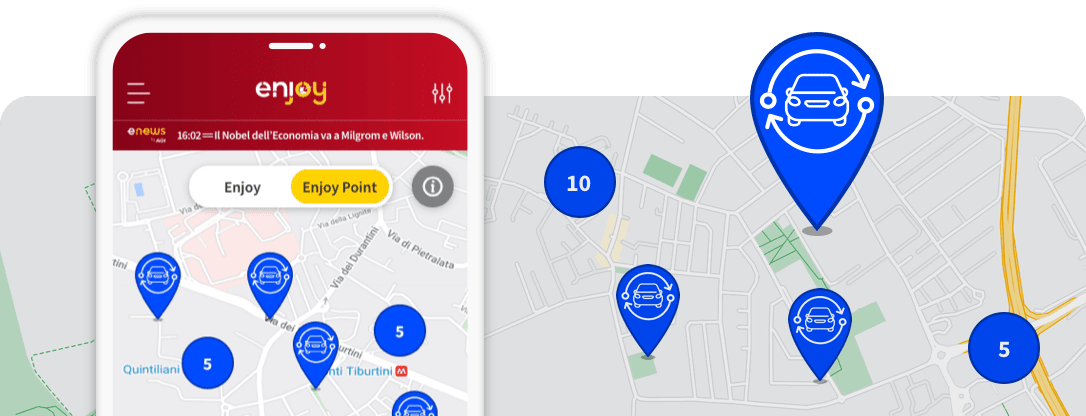
Move freely with Enjoy Points.

Discover our dedicated areas where you can start and end your rental with ease, and even book your car up to 24h in advance: no queues, no hassle. Insurance and fuel are always included. Enjoy Points are marked on the map with a dedicated icon.

Milan, Florence and Turin are now Enjoy Point stations.
  • Move with Enjoy
  • Rates & Services
  • Rates
  • What's Included
  • Business
  • Enjoy Parking
  • Enjoy Car Delivery
  • News
    Subscription
  • Fleet & Instructions
  • Partner
  • Coverage area
  • IT EN
Enjoy
  • IT
    ENJOY - Bologna
  • Move with Enjoy
  • Rates & Services
  • Fleet & Instructions
  • Coverage area
  • Partner
Personal details
History
Voucher
Logout
Rates
Discover the rates tailored for you.
What's Included
Move around the city and beyond with the peace of mind of having everything included.
Enjoy Parking
With Enjoy, even parking gets easier.
Enjoy Car Delivery
Book a car in advance: we will deliver it to you.
Business
Enjoy Business. The most convenient solution for your business trips.
Subscription
Save on your rentals with Enjoy subscriptions.
Everything you need to know to get the best out of Enjoy.
REGISTRATION
BOOKING WITH ENJOY
OPENING THE VEHICLE
STARTING THE VEHICLE
DO'S and DONT'S
PARKING AND ENDING YOUR RENTAL
CHARGING
SAFETY ON BOARD
ENJOY PARKING
WHEN AND HOW TO PAY
SUBSCRIPTION
VOUCHERS
PIN CODE
USER PROFILE
CANCELLATION
IN THE EVENT OF AN ACCIDENT
INSURANCE
MALFUNCTIONS
You can register for Enjoy in the App with either an Italian or foreign driving licence. You just need to be over 18 and have held a valid driving licence for at least one year. Registration is free of charge.

If you have an Italian licence:
There's no need to send or receive any paper documents. Just keep your tax code and Italian category B licence handy when registering for the service.

If you have a foreign licence:
Licences from the EU, UK, Switzerland, Russia and the USA are accepted.
During registration on the App, you will be asked to upload a copy of your ID card or passport, your driving licence and your international driving permit (if required).

After your registration is complete and your documents have been successfully verified, the Enjoy Team will send you a confirmation email. This will include the contract documents and your unique personal PIN code, which you'll need to use the vehicles.

Don't forget to add a payment method so you're ready to start renting right away. To be enabled for the service, you must provide a credit card, debit card, or PayPal account registered in your name.
With Enjoy, you can pick up and return any available vehicle using the App, within your city’s coverage area. Use the Enjoy section of the map on the website or in the App to find the closest vehicle, or simply rent one you spot on the street. Booking is free for the first 20 minutes. After that, a per-minute rate applies.

The Enjoy Vehicle Sharing service is currently available:
  • Until January 12, 2026 (after that, the service in these municipalities will be Enjoy Point):
    • in the municipality of Milan and in the municipalities of San Donato, Sesto San Giovanni, Settimo Milanese, Peschiera Borromeo, Cesano Boscone and Corsico
    • in the municipality of Florence
    • in the municipality of Turin
  • Until January 21, 2026 (after that, the service in these municipalities will be Enjoy Point):
    • in the municipality of Rome
    • in the municipality of Bologna

Vehicles are parked in their respective service coverage areas and there are no fixed pick-up or drop-off stations. You can book one vehicle at a time and keep it for as long as you need, paying only for the time you use it.

FINDING AN ENJOY VEHICLE
Using the Enjoy App, you can locate all available vehicles near your current location or any address you choose. Just tap “Book this vehicle” to reserve it. You can also check for available vehicles nearby by visiting the “Coverage Area” section of the website.

ON THE STREET
If you come across an available vehicle, you can use it straight away without booking. Check the light on the windscreen to see its status:
  • Red – in use
  • Flashing red – out of service
  • Yellow – booked
  • Green – available

Booking is free for the first 20 minutes, even if you cancel. After that, a per-minute charge applies for up to 70 more minutes. The countdown in the App will turn from green to red to show when the paid period begins. Cancel the booking if you no longer need the vehicle or can’t reach it within 90 minutes.

WARNING: if you repeatedly book vehicles without using them, the Enjoy team may suspend your access to the service.

Once your booking is complete, a confirmation screen will appear and the booking reminder will stay visible in your personal area. You’ll also receive an email with all the details. You won’t be able to book the same vehicle again for 120 minutes after a booking ends or is cancelled. However, you can still start the rental by going to the vehicle, tapping “Rent” in the App and entering the licence plate and vehicle code shown on the windscreen.

MORE TIME FOR YOUR BOOKING
If you need more time to reach your Enjoy, you can choose to book it in advance for 1, 2, 3 or 4 consecutive hours for an extra fee. Also, from 9:00 p.m. onwards, you can book the vehicle until 8:00 a.m. the next day. If you don’t make it in time, you’ll have an extra 30 minutes to unlock it, again with an additional charge.

Make sure Bluetooth is switched on and that you have granted Bluetooth permissions to the Enjoy App in order to start your rental with Enjoy.
Make sure you have Bluetooth turned on and have granted Bluetooth permissions to the Enjoy App in order to go.

Once you've reached your booked vehicle, you can unlock it using the App by pressing the "Unlock Vehicle" button.
For vehicles found on the street, enter the vehicle code and number plate in the "Rent" section of the App, then press the "Unlock vehicle" button.

WARNING: After being unlocked, the vehicle will automatically lock again after 1 minute. You can unlock it again within 5 minutes of the first unlock using one of the following methods:

  • Through the App with the "Re-open" command.
  • Through Enjoy Customer Service by calling 800.900.505 and providing the licence plate and vehicle code visible from outside the passenger compartment.
For assistance in English or if you're using a foreign SIM, contact +39 02 233.22.222 at the cost of a landline call as provided by your operator.
The Enjoy XEV Yoyo is a heavy electric quadricycle with manual transmission, approved for up to 2 passengers.

Before starting your rental, make sure you’ve installed the latest version of the Enjoy App.Once the rental begins, enter your PIN directly on your smartphone.

If the vehicle is damaged, very dirty or the key is missing, report it via the App or contact Enjoy Customer Service. If you believe the car isn’t fit for use, you can release it and choose a different one.

STARTING AND STOPPING THE XEV YOYO:
To start the XEV Yoyo properly:
  • Ensure the gear selector is in the Neutral (N) position.
  • Press the brake pedal while pressing the Start/Stop button.
  • Hold the brake down until the welcome message appears.
  • Release the parking brake by pressing the pedal on the lower left all the way down.
  • When the word “READY” appears on the display, the vehicle is ready to drive.
To stop the vehicle properly:
  • Return the gear selector to N (Neutral).
  • Without pressing the brake pedal, press the Start/Stop button.
The Enjoy XEV Yoyo is a heavy electric quadricycle, which means it is not permitted on motorways or main extra-urban roads, just like bicycles, mopeds and motorcycles under 125cc. To avoid violations, always check that there are no 125cc restrictions at the entrance of a road. You can drive without time limits, as long as you comply with the Highway Code and other applicable regulations and always act with maximum care and responsibility.

You can drive Enjoy vehicles only within Italy, both inside and outside the coverage area or Enjoy Points and with no time limits, as long as you comply with the Highway Code and civil and criminal laws. At the end of your rental, you must park within the ELECTRIC vehicle coverage area, clearly marked in the App and on the website.

Until this is done, the rental will continue to be charged and the vehicle will remain under your responsibility.Access to lanes reserved for public transport and pedestrian areas is prohibited.

With Enjoy XEV Yoyo vehicles, you can access some, but not all, Limited Traffic Zones (ZTLs).
Here's where you can go:

Milan
You can access the LTZs called “AREA C” and “AREA B”.

You cannot pass through the LTZs with access allowed at set times only for specific categories of users (e.g. residents with permits) and for particular types of vehicles.

XEV Yoyo vehicles are not allowed to access roads or lanes reserved for public transport.

For more information see the dedicated page of the Milan municipality website:
http://www.comune.milano.it/wps/portal/ist/it/servizi/mobilita/ZTL_AUTORIZZAZIONI/ZTL

Rome
With Enjoy you can drive and park, at no extra cost, in all LTZ areas except the A1 Trident LTZ between Piazza del Popolo, Passeggiata di Ripetta and Via del Babuino.

XEV Yoyo vehicles are not allowed to access roads or lanes reserved for public transport.

For more information, visit the dedicated page on the Roma Mobilità website:
https://romamobilita.it/it/servizi/ztl

Florence
With Enjoy you can drive in all LTZs at no extra cost.

XEV Yoyo vehicles are allowed access to streets and lanes reserved for public transport.

For more information visit the dedicated page on the website of the municipality of Florence:
https://mobilita.comune.fi.it/mobilita_sostenibile/mobilita_sostenibile/car_sharing.html

Turin
You can drive only in the Central and Roman LTZs, while access and transit are forbidden in the LTZs reserved to public transport, in the Valentino LTZ, in the pedestrian LTZs that extend over the following areas:

  • Via San Francesco D'Assisi
  • Via Arsenale, Via XX Settembre
  • Via Accademia Albertina
  • Via Pietro Micca (in the direction of Piazza Castello)
  • Via Milano
  • Via Rossini (in the direction of via Po)
  • Piazza Statuto
  • Via Valperga Caluso
XEV Yoyo vehicles are allowed to access roads or lanes reserved for public transport.

For more information visit the dedicated page on the website of the municipality of Turin:
http://www.comune.torino.it/torinogiovani/vivere-a-torino/car-sharing-a-torino

Smoking is strictly prohibited inside Enjoy vehicles. If you violate this rule, you'll be charged for the internal cleaning of the vehicle. Additionally, we are sorry, but transporting animals is not allowed.
To end your rental, tap the red "End Rental" button at the bottom of the screen after parking the vehicle within the dedicated coverage area for ELECTRIC vehicles (clearly indicated in the App and on the Website):

  • in any blue-lined public parking space;
  • in all Enjoy – Car Sharing reserved parking areas, visible on the App or Website;
  • in residents-only parking areas in Milan, Florence and Bologna (but not in other cities).

Until this is done, the rental will continue to be charged and the vehicle will remain under your responsibility.

For a temporary stop, you can park:
  • In the cities of Rome, Florence, Turin and Milan, in any permitted parking space within the coverage area and for free in blue-line paid parking spaces in the city where the rental began;
  • Outside the coverage area in designated spaces allowed under the Highway Code and local regulations. Parking fees are not included in the rental price and must be paid by the driver according to the rules set by the local municipality.
  • In any Enjoy reserved parking spaces, visible on the website or in the App;
  • In resident-only parking spaces in Milan, Florence and Bologna (but not in other cities).
Remember, you can NOT end your rental in the following cases:
  • outside the coverage area;
  • In private or company car parks, or any location with restricted access or set opening hours (such as supermarket car parks). The only exception is designated Enjoy spaces that are clearly marked and shown in the App
  • In time-limited parking spaces (disc zones)
  • charging point bays – even if the vehicle is electric
  • In areas with daily or hourly restrictions that will apply within the next 48 hours (for example, street cleaning or market days). So if a parking ban starts at 09:00 a.m. on Tuesday, you cannot end your rental there after 09:00 a.m. on the preceding Sunday.
  • In spaces reserved for disabled parking, law enforcement, goods loading/unloading, taxis, NCC drivers, or diplomatic and institutional vehicles.
If you’re ending your rental, make sure you’re within the coverage area and that the vehicle is parked in a location where GPS and/or GSM signals can be detected. If not, the App will ask you to move the vehicle to an area with better reception.
Before leaving, check that the windows are closed, the key is left inside, the lights are off and the handbrake is engaged. Then tap “End rental” in the App.
Before renting a XEV Yoyo, check the vehicle’s battery level. With a full 100% charge, you can cover a distance of around 130 km at an average speed of 80 km/h.

These vehicles are recharged using Battery Swapping technology. Currently, customers cannot recharge the vehicle themselves; therefore, the rental must be ended when the battery level drops below 30%, to avoid penalties. Once the charge drops to 20%, the vehicle's speed is progressively reduced to optimise energy consumption.
Enjoy vehicles are equipped with a telematics device that monitors proper vehicle use and helps determine the dynamics of any incidents.

For your safety and that of others, always drive responsibly and in accordance with traffic laws.
Enjoy Parking are paid car parks reserved for Enjoy customers, with a fixed fee applied both at the start and end of a rental.

Parking is not allowed in these areas, you can only start or end your rental.

Parking fees will be charged directly at the end of your rental and displayed on your receipt.

In Milan, you can use paid parking at:
  • Milan Linate Airport
    • 21 parking spaces reserved for the service.
    • Flat rate of 5.50€ for each start and end of rentals at this car park.
    • The car park is open-air, secure, and available 24/7. Enjoy spaces are located on the sixth floor of P2 parking.
  • Milan Malpensa Airport
    • 10 parking spaces reserved for the service.
    • Flat rate of 19,99€ for both starting and ending rentals at this car park.
    • The car park is open-air and available 24/7. Parking spaces are located at P3 Express, opposite the entrance to Malpensa Express Terminal 1. Access the car park using the dedicated car-sharing ramp with an automatic barrier.

In Rome, you can use the paid parking at:
  • Roma Termini Station
    • 15 parking spaces reserved for the service.
    • Flat rate of 4,99€ for both starting rentals at this car park.
    • The car park is located at Via Marsala 53 and is available 24/7. Automatic barriers recognise Enjoy vehicles through electronic number plate reading.
  • Rome Fiumicino Airport – Leonardo da Vinci
    • 20 parking spaces reserved for the service.
    • Flat rate of 12,00€ for both starting and ending rentals at this car park.
    • The car park is located on the terrace of Parking B - Terminal 1 and is available 24/7. Automatic barriers recognise Enjoy vehicles through electronic number plate reading.
  • Rome Ciampino Airport
    • 10 parking spaces reserved for the service.
    • Flat rate of 6,99€ for both starting and ending rentals at this car park.
    • The car park is located at Parking P5 and is available 24/7. Automatic barriers recognise Enjoy vehicles through electronic number plate reading.

In Rome you can use the free parking at:
  • Campus Bio-Medico
    • 18 parking spaces reserved for the service.
    • The car park is located on Via Redgo Scodro and is available every day from 06:00 to 22:00.
  • Policlinico Gemelli
    • 18 parking spaces reserved for the service.
    • The car park is accessible 24/7 from Via della Pineta Sacchetti, 217 and from Monday to Friday, from 6:00 to 20:00, also from Largo Francesco Vito.

In Turin you can use the paid parking at:
  • Turin Caselle Airport
    • 16 parking spaces reserved for the service.
    • Flat rate of 7,99€ for both starting and ending rentals at this car park.
    • The parking is accessible following the Car Sharing – Arrivals signs and is secure and available 24/7. Automatic barriers recognise Enjoy vehicles through electronic number plate reading.

In Florence, you can use the free municipal parking reserved for free-floating car-sharing services – Enjoy.

Please refer to the in-app map to view all addresses.
The amount will be charged to your profile immediately after the end of the rental if you choose the per-minute rate.

For prepaid daily or hourly rates, the service charge will be applied at the start of the rental. Any additional costs, such as for excess kilometres, parking or other services, will be charged at the end of the rental.

If you're using an Enjoy Subscription, the selected plan will be charged when you first subscribe. For monthly renewals, payment will be taken 2 days before the renewal date.

With the exception of rentals using the daily or hourly rates, a vehicle unlock fee applies. You can check this amount in the App. It will be added to the total rental cost at the end of your rental.

At the end of each rental, you’ll receive a summary email including the following information:
  • Rental number
  • Licence plate and model of the vehicle
  • Start and end time and location of the rental
  • Total duration (partial minutes are rounded up to the nearest full minute starting from the 31st second)
  • Kilometres driven
Also:
  • Breakdown of costs (Rental fees, Reservation, Extra charges etc.) with any applicable vouchers or subscriptions deducted.
You can always access your full rental history from your personal profile. Your monthly invoice, issued electronically and available in the personal area of the App, includes a detailed overview of charges and credits incurred during the month, specifying individual uses and any additional costs.

ADDITIONAL COSTS
In addition to the cost of your rental and any optional services (e.g. reservation), you may incur further charges and expenses resulting from the rental itself, such as:
  • Administrative charges (e.g. for traffic offences or reactivation of the service following a suspension for an expired licence)
  • Intervention by a support operator (e.g. extraordinary cleaning to excessively dirty vehicles, leaving lights on, or parking in a prohibited area)
  • Claims handling (e.g. delayed or missing claim form, accidents for which you are at fault)
  • Other (e.g. loss or damage of the ignition key, failure to report an accident, use of the vehicle abroad)
The full list of applicable cases is detailed in the "Penalties" annex of the General Terms and Conditions of Contract.

ACCEPTED PAYMENT METHODS:
To activate the service, the following payment methods are accepted:
  • Credit card
  • Debit card
  • PayPal account in your name

Vouchers can also be used to pay for rentals. Your vouchers will automatically be applied to the next rental and deducted from its total cost.

To use vouchers, you must still register a valid payment method (credit card, debit card, or PayPal).

Currently, the service only accepts MasterCard, American Express, and Visa cards enabled for online payments. Prepaid cards are not accepted.

Your card and PayPal details are stored by Nexi using top-level security technology, including anti-fraud and SecureCode systems (MasterCard SecureCode, American Express Safekey, Verified by Visa). These systems offer extra protection for your online purchases, helping prevent fraudulent use of your card and unwanted charges to your account.

You can update your stored payment details at any time by accessing Nexi through your Enjoy personal area.

WARNING: If you confirm the deletion or replacement of a card or PayPal account, the previous data will be removed from the Nexi database. To continue using the service, you will need to enter and verify a payment card accepted by Enjoy or link a valid PayPal account.

Please note that if there is no valid payment method active on your profile, your account will be blocked and you will not be able to rent.

Are you a freelancer? Add your VAT number to your profile to receive invoices with the billing information you’ve provided.
Subscriptions allow you to rent an Enjoy by paying for rental minutes at a lower price than the standard per-minute rate.

You can choose between:

Drive Subscriptions

  • Drive 100, which includes 100 minutes of rental per month and automatic monthly renewal.
  • Drive 300, which includes 300 minutes of rental per month and automatic monthly renewal.
  • Drive 500, which includes 500 minutes of rental per month and automatic monthly renewal.

Drive Pass Subscriptions

  • Drive Pass 100, which includes 100 minutes of rental to be used by the expiration of the Pass, equal to 1 day from activation, without automatic renewal.
  • Drive Pass 300, which includes 300 minutes of rental to be used by the expiration of the Pass, equal to 3 days from activation, without automatic renewal.
  • Drive Pass 500, which includes 500 minutes of rental to be used by the expiration of the Pass, equal to 5 days from activation, without automatic renewal.

Daily Subscriptions

  • Daily 60, which includes 60 minutes of rental per day and automatic monthly renewal.
  • Daily 120, which includes 120 minutes of rental per day and automatic monthly renewal.
  • Daily 180, which includes 180 minutes of rental per day and automatic monthly renewal.

Additionally, the minutes included in the subscription can be used to cover any extra minutes from rentals charged at hourly or daily rates, should you exceed the maximum time specified in your chosen prepaid rate. The subscriptions are also valid for rentals from Enjoy Points.

The benefits of subscriptions are:

Drive and Drive Pass Subscriptions:

  • No unlocking fee with an active subscription and remaining minutes available, so you can rent without paying the extra fee of 1€.
  • Maximum 24-hour rate for Cars at 39€, instead of 69€, except for Enjoy Points.
  • Maximum 24-hour rate for Cargo at 49€, instead of 89€, except for Enjoy Points.

Daily Subscriptions:

  • No unlocking fee with an active subscription, even if remaining minutes are used up, so you can rent without paying the extra 1€ rate.
  • Maximum 24-hour rate for Cars at 39€, instead of 69€, except for Enjoy Points.
  • Maximum 24-hour rate for Cargo at 49€, instead of 89€, except for Enjoy Points.
  • Reduced rate for extra minutes at 0,15€/min.
  • Reduced rate for Eextra km at 0,15€/km.
  • Reduced rate for extended booking at 0,05€/min.
  • 50% discount on all Enjoy Parking.

Each rental initiated under the Drive and Drive Pass subscription plans includes 50 km. For any additional kilometers (beyond those included), the extra kilometer rate in effect at the time the rental begins will apply, unless different rates apply under your convention.

Each rental initiated under the Daily subscription plans includes 50 km. The cost for each extra km beyond those included is charged at 0,15€ per km.

Once the included minutes in your Drive or Drive Pass subscription have been used up, even during an ongoing rental, you may continue to use the Enjoy car sharing service at the standard rate in effect at the start of the rental plus a €1 vehicle unlock fee or at the dedicated rate provided under your active convention.

Once the threshold of minutes included in the Daily subscription has been exceeded, even mid-rental, you can continue to use the Enjoy car-sharing service at a special rate of 0,15€/min, with free vehicle unlocking. With Daily plans, your available minutes are reset the next day.

If you need more minutes, you can always upgrade to a higher plan starting from the next renewal of the Drive and Daily plans, or upon the expiration of the Drive Pass plans.

To purchase a subscription:
  • 1. Click on the “Subscription” icon at the bottom of the Home Page in the App and continue to the next screen through the “Activate a subscription” button.
  • 2. Choose the plan that best suits you and continue with the purchase.
  • 3. Review the details, select your payment method and confirm.
  • 4. Upon confirmation, your subscription will be immediately active.

You will receive an e-mail with all the details of your subscription purchase. You will also receive an additional e-mail with each automatic monthly renewal.

In the “Subscription” section of the App, you can always check your remaining minutes and view the expiration or renewal date of your subscription.

The Drive and Daily plans renew automatically on the same date each month unless you choose to cancel and unless there is no capacity on your payment method. You can cancel your subscription anytime, and the cancellation will take effect at the end of the ongoing monthly subscription. If the renewal date falls on a day not present in a particular month, such as the 31st, the renewal will occur on the last day of that month (e.g., subscribe on 31st August, renewals on 30th September, 31st October, 30th November, etc.).

Drive Pass plans have a fixed expiration date and do not renew automatically.

The minutes included in the subscription cannot be accumulated. Unused minutes will automatically expire after the subscription period ends.

You can modify your subscription by going to the “Subscription” section in the Enjoy App and clicking on “Modify or cancel subscription”. If you do this within 58 hours before the expiration of plans with automatic renewal, the change will be effective from the next available renewal. Otherwise, the changes will apply to the subsequent renewal. Once the change takes effect, your subscription will automatically renew with the new plan you have subscribed to.

Drive Pass plans cannot be modified as they do not include automatic renewal. After your current Drive Pass expires, you can always subscribe to a new Drive Pass or to a Drive or Daily plan.

You can cancel your subscription by going to the “Subscription” section in the Enjoy App and clicking on “Modify or cancel subscription”. For plans with automatic renewal, the cancellation will take effect at the end of the ongoing monthly subscription.

Drive Pass plans cannot be cancelled as they do not have automatic renewal. After your current Drive Pass expires, you can always subscribe to a Drive or Daily plan.

RIGHT OF WITHDRAWAL

Unless otherwise specified by specific incentive programs, including those related to sustainable mobility, or as otherwise provided by sector regulations, you can exercise the right of withdrawal within 14 days from the date of purchase of the subscription by writing to the address servizioclienti@enjoy.eni.com with the subject: “Subscription right of withdrawal”. Click here if you prefer to download the form directly from the Website.

Please note that if you make a rental paid using the subscription minutes during the withdrawal period (which lasts for 14 days from the date of validity of the subscription itself, or in any case by the expiration date of the subscription, if shorter), it will no longer be possible to exercise the right of withdrawal.
Vouchers correspond to a value in euros that Enjoy automatically credits to your account following certain actions you may take.

Your vouchers will be automatically applied towards your next rental and deducted from the total rental cost.

Example: Yesterday, you received a voucher worth 5€. Today, you book a 2-hour rental using the hourly rate, costing 16€. At the end of the rental, you’ll only be charged 11€ (16€ rental cost minus 5€ voucher).

Please note that to use your vouchers, you must still register a valid payment method (credit card, debit card, or PayPal).
RIGHT OF WITHDRAWAL
Unless otherwise specified by incentive programmes (such as sustainable mobility initiatives) or required by sector regulations, you may exercise your right of withdrawal within 14 days of purchasing your subscription by writing to servizioclienti@enjoy.eni.com with the subject line: “Gift card right of withdrawal”. Click here if you prefer to download the form directly from the Website. Please note: if you choose to use the service immediately, this will be considered an explicit request to benefit fully or partially from the Gift Card during the withdrawal period. In such cases, if you later decide to exercise your right of withdrawal, only the unused portion of the Gift Card, net of any discounts and promotions, will be refunded to your payment method.
Your PIN code is provided via the confirmation email and SMS you receive when you register.

It’s a personal code (always the same one, so make sure you remember it) that you’ll need in order to use the vehicle: to start the engine, you’ll be asked to enter it directly on your smartphone. If your phone supports it, you can use biometric recognition instead of entering the PIN manually. Please make sure you have the latest version of the App installed.

The PIN code is strictly personal and must not be shared with others. If you suspect that someone else may be using your PIN, please contact Enjoy Customer Service immediately to report the issue.

If you forget or lose your PIN code, go to your Enjoy profile in the App, under Personal Details, to request it again. You’ll immediately receive an SMS with your PIN.
Your user profile is created when you register and is essential to access Enjoy services. It includes your personal information, ID details, driving licence, email address and your preferences regarding service and marketing communications.

Some information can be updated at any time, while others cannot. Here is a detailed overview of the actions you can take in your personal profile.

CHANGING YOUR EMAIL ADDRESS
Your email address is essential for using Enjoy services: it’s your username to log into the App and the address to which we send all service communications, booking confirmations, rental invoices and important notifications, such as your driving licence expiry.
To update your email address, go to the "Personal Profile" section in the App, tap on "Email address" and select “Change email”.
Enter your new email address and confirm the change. You’ll receive a confirmation email at your old address and an activation email at the new one.

CHANGING OR RECOVERING YOUR PASSWORD
To change your password, access the "Personal Details" section of your profile in the App, under “Security” and tap on “Change password”.
Enter your current password and then the new password twice. Once you confirm, you’ll receive an email notification confirming the change.
If you’ve forgotten your password, tap “Log in” in the App and then select “Forgot your password?”. Enter your email address to receive a temporary code, which you can use to access your profile and reset your password under “Security” in the “Personal Profile” section.

UPDATING AN ITALIAN DRIVING LICENCE DETAILS
You can update your Italian driving licence details at any time, for example, if it has expired, been lost or replaced. Go to the “Personal Details” section in the App, under “Driving licence details” and select “Update licence”.
Enter the details of your new licence and confirm. You’ll receive a notification email once the update is complete.

UPDATING A FOREIGN DRIVING LICENCE DETAILS
You can only update your foreign licence details if your current licence has expired. Enjoy will notify you when it’s time to update your document and you’ll be able to upload a copy of the new licence directly in your profile.

CHANGING YOUR PAYMENT METHOD
Want to change your payment method for Enjoy?
You can do it anytime. Simply go to “Personal Profile” in the App, tap “Payment method”, then select “Change card details”.
Confirm your choice. Once you tap “Change card details”, your existing payment method will be removed and you’ll be redirected to the secure Nexi site to enter a new payment method.

VIEWING YOUR PERSONALISED RATES
If you're eligible for discounted rates through a special agreement with Enjoy, you can view them in the "Rates" section of your profile. Here you’ll find a table clearly outlining your rental and booking rates.

MARKETING COMMUNICATIONS
You can update your preferences for receiving marketing communications from Enjoy or its partners at any time.
In the App, go to “Personal Profile”, then “Personal Details” and select or deselect the boxes for “I agree” or “I do not agree”. Tap “Save changes” to confirm. Please note: regardless of your marketing preferences, you will continue to receive all essential service-related communications from Enjoy via email or through the App.
If you wish to cancel your subscription to the service, you can do so at any time:
  1. through the dedicated feature on the Enjoy App
  2. by contacting Customer Care at 800 900 505 (Italian-speaking line) or +39 02 2332 2222 (English-speaking line)
  3. by emailing us at privacy@enilive.com

Cancellation will take effect immediately, or in any case once any ongoing vehicle rental has been completed.

Please note that if you continue to use Enjoy services during the notice period, any charges incurred will be billed accordingly.
First, call Enjoy Customer Service immediately. Describe the type of accident, the damage to the vehicle and provide the exact location.

Depending on the situation, you will receive all necessary instructions (for further details, please refer to the Regulations).

If you are asked to fill in a CID (Accident Statement) form, you’ll find one in the vehicle’s glove compartment (please remember to put it back once completed).

ENJOY CUSTOMER SERVICE
The possible scenarios are as follows:
  1. If an operator needs to come to the scene – currently not available for Enjoy Point rentals:
    • Unless you require medical assistance, you must remain at the location until the operator arrives;
    • You must hand over any completed CID forms and any reports issued by the authorities (e.g. police, traffic wardens, or other relevant authorities) to the operator.
  2. If no operator is needed on site:
    • Please leave the completed CID form and any authority reports in the glove compartment of the vehicle.
    • Even if the vehicle is still operable, you must ask for authorisation from Enjoy Customer Service before continuing the rental.
If the vehicle is no longer usable, Enjoy Customer Service will end the rental on your behalf.

If the vehicle is located outside the Coverage Area or beyond an Enjoy Point (over 50 km away), the return or continuation of your journey (e.g. by train, plane, or overnight stay) will be covered by Enjoy within the limits set by the Regulations. In any case, Enjoy Customer Service will provide instructions first, followed by the operator if needed.

To contact Customer Service: 0645212008

For assistance in English or if you’re using a foreign SIM card, call +39 0645226913 (charged at your provider’s standard rate for calls to Italian landlines).
All Enjoy XEV YoYo vehicles are covered by third-party liability insurance (R.C.A.) with a limit of 25,000,000€ (twenty-five million). In the event that the Customer is fully or partially responsible for an accident, a deductible of 500€ (five hundred) will apply.

Enjoy also provides coverage against fire, theft and damage to the rented vehicle under the following conditions:

  • in case of theft or fire, a deductible of 500€ (five hundred) will be charged to the Customer:
  • in case of damage to the rented vehicle, a deductible of 750€ (seven hundred and fifty) will be charged to the Customer.

Enjoy also provides personal accident insurance for the Customer: in the event of death, the insurance covers up to 50,000€ (fifty thousand). In the event of permanent disability, the coverage is also up to 50,000€ (fifty thousand). Additionally, medical expenses are reimbursed up to 3,000€ (three thousand).
If the vehicle is parked in a permitted space within the Enjoy service coverage area:
  • call Enjoy Customer Service, describe the issue and provide the exact location of the vehicle. You will not need to wait for an operator to arrive.

If the vehicle is not parked in a permitted space or is outside the coverage area:
  • call Enjoy Customer Service, describe the issue, provide the exact location of the vehicle and wait at the location for an Enjoy operator to arrive;
  • if the vehicle breaks down more than 50 km from the service coverage area and repairs require the vehicle to be out of service for more than 24 hours, the cost of returning home or continuing your journey (by train, plane and any overnight stay) will be covered by Enjoy within the limits set out in the Terms and Conditions.

If the vehicle was rented from an Enjoy Point:
  • call Enjoy Customer Service, describe the issue, provide the exact location of the vehicle and follow the instructions provided;
  • if the vehicle breaks down more than 50 km from the Enjoy Point where it was picked up and repairs require more than 24 hours, the cost of returning home or continuing your journey (by train, plane and any overnight stay) will be covered by Enjoy within the limits set out in the Terms and Conditions.
Download the Enjoy App
and book a vehicle from your smartphone
Follow us on our channels
to request any information:
@Enjoy
Enjoy
© 2024 Enjoy - All rights reserved
Terms and Privacy • Policy cookies • FAQ • Contact us • Accessibility
Download App Terms and Privacy Policy cookies FAQ Contact us Accessibility
Terms and Privacy • Policy cookies • FAQ • Contact us • Accessibility
© 2024 Enjoy - All rights reserved

Enilive S.p.A.
Società soggetta all'attività di direzione e coordinamento di Eni S.p.A

Enilive S.p.A.
Società soggetta all'attività di direzione e coordinamento di Eni S.p.A

Sede legale in Roma,
Viale Giorgio Ribotta 51, 00144
Capitale sociale
€ 437.094.420,00 interamente versato

Reg. Imprese di Roma
Cod. Fisc. 11403240960
Partita IVA: 11403240960

R.E.A. Roma
n. 1676444

Switchboard Tel. +39 06 59 88.1 - www.eni.com